Bingetrax 4K buyers need to know whether Bingetrax.tv supports Ultra HD, what hardware and internet speed are required, how much it costs, and whether it can be tested before a longer commitment.
The current offer advertises HD, Full HD, and 4K support, but that does not promise every channel, movie, or series in native 4K. This guide separates the published offer from the technical conditions that determine the picture on your screen.

Table of Contents
Table of Contents
What Is Bingetrax 4K?
Bingetrax 4K refers to the Ultra HD viewing capability promoted as part of the Bingetrax.tv streaming subscription. The service is designed to deliver live television categories and on-demand listings through an internet connection, a compatible player application, and a supported device rather than through a conventional cable receiver.
The Bingetrax subscription page currently states that its plans include HD, Full HD, and 4K support. It also lists live channel categories, movies and series, sports and events, EPG and catch-up compatibility where available, setup guidance, and technical support.
Those are provider-published details. Catalog size, individual titles, channel availability, guide data, catch-up access, and stream quality can change, so a purchase decision should be based on the categories and devices you actually plan to use.
What “4K support” actually means
4K UHD normally describes a 3840 × 2160 video output, four times the pixel count of 1080p Full HD. A good source can show more detail on a large compatible television.
However, the final resolution depends on the entire playback chain:
- The source stream must be available in 4K.
- The player must support the stream’s video codec and resolution.
- The streaming device must be able to decode and output 2160p.
- The television or monitor must accept a 4K signal.
- The HDMI port and cable must support the required format.
- The network must sustain the stream without repeated drops.
If one part of that chain is limited to 1080p, the screen will not display native 4K. This is why the phrase “4K supported” should be read as a capability, not a guarantee that every listing is delivered in that format.
Bingetrax 4K versus HD and Full HD
| Quality level | Typical resolution | Best use | Main limitation |
|---|---|---|---|
| HD | 1280 × 720 | Smaller screens or slower connections | Less detail on large 4K televisions |
| Full HD | 1920 × 1080 | General live TV and everyday viewing | Not as detailed as a good native 4K source |
| 4K UHD | 3840 × 2160 | Large 4K screens, movies, and selected high-detail content | Requires a 4K source, device, display, and stronger stable bandwidth |
Resolution is only one part of picture quality. Bitrate, compression, frame rate, HDR, and source quality can make good 1080p look better than heavily compressed 4K.
What Does the Bingetrax 4K Subscription Include?
The current homepage advertises 42,000+ live channel listings, 125,000+ movies and series, sports and event categories, HD through 4K support, EPG, catch-up where available, one to five connections, setup guidance, and support. These provider-published catalog figures were not independently audited and do not confirm that a specific listing will always be available.
Use the following criteria to evaluate the offer:
- Confirm the exact category or content you need.
- Check whether the desired listing is live, on demand, or catch-up.
- Verify its available resolution during a trial.
- Test at the same time of day you normally watch.
- Confirm the player works on your primary device.
- Choose the number of simultaneous streams your household needs.
Several websites use similar Bingetrax branding, but their prices, catalog claims, policies, and contact details are not identical. This article refers specifically to bingetrax.tv; confirm the address bar before entering order or payment information.
Bingetrax 4K Pricing and Plan Comparison
As checked on August 21, 2026, Bingetrax.tv displays the following one-device prices. The effective monthly amounts are simple calculations from the listed one-time totals, not separate monthly billing offers.
| Plan duration | Listed total | Simultaneous connections | Approx. monthly equivalent |
| 1 month | $16 | 1 | $16.00 |
| 3 months | $36 | 1 | $12.00 |
| 6 months | $55 | 1 | $9.17 |
| 12 months | $75 | 1 | $6.25 |
The site also provides selectors for two, three, four, or five connections. Because the total changes with the selected duration and connection count, review the live Bingetrax pricing options and confirm the order summary before payment.
Which plan should a first-time buyer choose?
The longest plan has the lowest monthly equivalent among the displayed one-device options but creates the largest upfront commitment. A lower monthly cost does not offset an incompatible device, missing content, or weak network performance.
A practical selection rule is:
- 1 month: Appropriate for a shorter initial commitment after basic compatibility has been confirmed.
- 3 months: Useful when the service already works on your main screen but you are not ready for a long term.
- 6 months: Better suited to an established setup and predictable household use.
- 12 months: Best considered only after the device, network, content categories, support process, and simultaneous connection requirement have been verified.
Before taking a longer plan, submit a Bingetrax trial request and confirm its current conditions. Do not assume terms shown on another Bingetrax-branded domain apply to Bingetrax.tv.
How many simultaneous connections are needed?
A connection is an active stream, not an installed application. One connection can cover several installed devices when only one screen watches at a time.
| Household viewing pattern | Connections to consider |
| One active screen at any moment | 1 |
| Two people often watch at the same time | 2 |
| Three simultaneous rooms or devices | 3 |
| Four or five active screens | Match the maximum concurrent use |
Do not pay for extra connections to improve the picture on one television. Connection count controls simultaneous use; it does not raise a 1080p stream to 4K or increase the bitrate of an individual stream.
What You Need to Watch Bingetrax in 4K

A Bingetrax 4K label cannot create a 4K picture. The source, device, display, player, and network must support the full playback path.
Display, streaming device, player, and HDMI requirements
Use this readiness checklist:
- A television or monitor with a native 4K panel
- A 4K-capable streaming device or a compatible 4K Smart TV app
- A player that supports the supplied account method and relevant video codecs
- A compatible HDMI input and cable when using an external streaming device
- Television output settings configured for 2160p
- A stream that is actually offered in 4K
Apple’s Apple TV 4K specifications require a 4K television and list HEVC support up to 2160p at 60 fps. Amazon’s Fire TV specifications show why the exact model matters: an HD-only stick and a Fire TV Stick 4K have different output capabilities.
HDR is separate from resolution. A device may support 4K but not the same HDR formats as the television or source. If HDR matters, verify HDR10, HDR10+, HLG, or Dolby Vision support across the source, device, HDMI connection, and display.
Internet speed and home-network requirements
No bandwidth number guarantees every 4K stream. Compression differs by source, while Wi-Fi interference and household activity reduce the speed available to the television.
Google’s YouTube requirements recommend 20 Mbps for 4K UHD, while the FCC’s Broadband Speed Guide lists 25 Mbps. Amazon’s Fire TV 4K guidance lists at least 15 Mbps for its environment.
For planning, allow at least 25 Mbps of stable bandwidth per active 4K stream, plus headroom for other household traffic. Two 4K screens can require 50 Mbps or more before phones, computers, and downloads are counted.
Stability matters as much as a single speed test. Prefer Ethernet; otherwise use strong 5 GHz or Wi-Fi 6 and reduce distance and obstacles between device and router.
Bingetrax 4K Device Compatibility
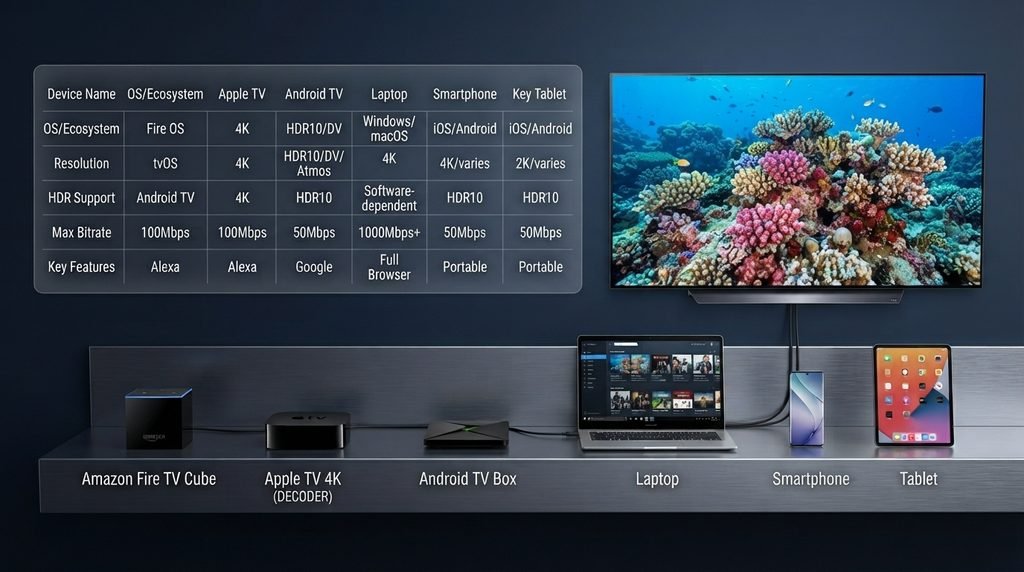
Bingetrax.tv lists Fire TV, Android TV, selected Smart TVs, phones, tablets, computers, Apple TV, and compatible TV boxes among its supported categories. Actual 4K output remains model- and application-dependent.
| Device category | Can it display 4K? | What to verify |
| Fire TV Stick 4K / 4K Max | Yes, with compatible hardware | Exact model, 2160p output, HDMI input, player availability |
| Fire TV Stick HD | No native 4K output | Use HD or replace it with a 4K-capable model |
| Apple TV 4K | Yes | Compatible tvOS player, 4K TV, HDMI path, codec support |
| Android TV or Android box | Model-dependent | 2160p output, codec decoding, app source, RAM and network stability |
| Smart TV | Model- and OS-dependent | Available player, television resolution, supported codecs |
| Phone or tablet | Device-dependent | Screen resolution, app support, casting limitations |
| Windows or Mac computer | Configuration-dependent | Player, monitor resolution, graphics output, codec support |
A recent 4K box or stick with reliable app support and stable networking is usually the safest primary device. A successful phone test does not prove the television can decode the same stream.
How to Set Up Bingetrax 4K
Screens differ by player, but the process is consistent. Follow the Bingetrax setup guide for device-specific instructions.
Bingetrax 4K setup checklist
- Verify the domain. Use bingetrax.tv and avoid assuming that similarly named sites share the same account system.
- Choose the duration and connections. Count simultaneous viewers, not the number of installed devices.
- Confirm the player. Install a compatible application from a trusted source when possible.
- Enter the account details exactly. A missing character, added space, or incorrect server address can cause authentication failure.
- Refresh the playlist and guide. Allow the categories and EPG to finish loading before troubleshooting.
- Set the device output to 2160p. Confirm the television recognizes a 4K signal.
- Test a listing marked as 4K. Do not judge the setup from an HD-only source.
- Test during normal viewing hours. This gives a more realistic picture of network and playback behavior.
After selecting a plan, the Bingetrax checkout shows the chosen device count, duration, and one-time total. Review all three before entering payment details.
How to confirm that a stream is actually 4K
Test a listing identified as 4K or UHD. Use the player’s information panel to look for 2160p or 3840 × 2160, and check the television’s incoming signal when possible. A 4K interface is not proof because a device can upscale lower-resolution video to a 2160p output.
Bingetrax 4K Trial: What to Test
A trial should be a compatibility test, not a quick catalog tour. Confirm availability through the Bingetrax trial page.
During the test, check:
- Login and playlist loading on the primary device
- A 4K-marked stream and several HD or Full HD streams
- Live content, on-demand content, and EPG behavior
- Audio synchronization and subtitle behavior where relevant
- Channel switching speed
- Playback during your normal peak viewing time
- Wi-Fi performance versus Ethernet, if both are available
- Support response for one real setup question
- Simultaneous playback if you intend to buy multiple connections
Record the app, device model, connection type, and error message when something fails. This gives Bingetrax support a clear starting point.
Bingetrax 4K Pros and Limitations
| Potential advantages | Limitations and checks |
| Published support for HD, Full HD, and 4K | Not every listing is necessarily available in native 4K |
| Plans from one to twelve months | Longer terms create a larger upfront commitment |
| One to five simultaneous connections | Extra connections increase price but not individual stream quality |
| Broad device categories | 4K output depends on the exact model, player, codec, and display |
| Trial request page | Trial availability and conditions may change |
| Setup and contact pages | Service quality should be evaluated on the buyer’s own device and network |
The offer is flexible in duration, connection count, device categories, and trial access. Its main limitation is that 4K must be verified on the buyer’s real content, device, display, and network.
Bingetrax 4K Troubleshooting
| Problem | Likely cause | Practical action |
| Stream plays below 4K | Source is HD, device output is 1080p, or adaptive quality reduced resolution | Test a known 4K listing, confirm 2160p output, and check available bandwidth |
| Buffering | Unstable Wi-Fi, insufficient available bandwidth, household congestion, or source-side issue | Test Ethernet, restart router and device, stop large downloads, compare another stream |
| Authentication failed | Incorrect username, password, server URL, or expired account | Re-enter details exactly and contact support if the account status is unclear |
| Playlist does not load | Network, server address, player, or account problem | Test another network, refresh the playlist, verify the URL, and restart the player |
| EPG is missing | Guide refresh, source mapping, time-zone, or player setting issue | Refresh EPG data, check time zone, and follow the player-specific setup instructions |
| Audio but no video | Unsupported codec or hardware decoding issue | Update the player, switch hardware decoding settings, or test a more capable device |
| Works on phone but not TV | Different app, codec, device output, or network path | Compare player versions and test the television device on Ethernet |
Change one setting at a time and replay the same listing. This isolates the account, source, player, device, or network as the cause.
What to Check Before Buying Bingetrax 4K
Use this buyer checklist before paying:
- Confirm the exact domain is bingetrax.tv.
- Identify the specific categories or listings that matter to you.
- Verify 4K availability on at least one relevant source during a trial.
- Confirm your television and streaming device both support 2160p.
- Check that the chosen player works on your operating system.
- Measure stable speed at the streaming device, not only beside the router.
- Count the maximum screens that will watch simultaneously.
- Compare the live plan total with your acceptable commitment length.
- Read the current terms and refund conditions before checkout.
- Save the order confirmation and support correspondence.
- Verify that the provider is authorized to distribute the content you intend to access in your location.
Device compatibility, access to the categories you value, and clear terms matter more than a headline catalog number.
Who Should Consider Bingetrax 4K?
Bingetrax 4K may suit viewers with a compatible 4K device, stable broadband, and willingness to test their setup before a longer commitment. It can also fit households that select the correct simultaneous connection count.
It may not suit someone expecting every listing in native 4K, needing one first-party app on every platform, or using unreliable internet. Buyers requiring independently verified channel rights may prefer a licensed mainstream platform or television provider.
Final Decision: Is Bingetrax 4K Worth It?
Bingetrax.tv presents 4K support, one- to twelve-month terms, one to five connections, broad device categories, trial requests, setup guidance, and support. Current one-device prices balance shorter commitment against a lower long-term monthly equivalent.
Base the decision on verification, not the 4K label. Confirm the domain, trial, content, resolution, player, device, television, network, connections, and checkout total. If those checks pass, review the current Bingetrax plans and choose the shortest commitment matching your confidence.
FAQ
Does Bingetrax support 4K?
Bingetrax.tv advertises HD, Full HD, and 4K support. Individual source availability and the complete playback setup still determine the actual resolution.
Is every Bingetrax channel available in 4K?
No. Expect mixed quality levels and verify the listings that matter during a trial.
How fast should my internet be for Bingetrax 4K?
Plan for at least 25 Mbps of stable bandwidth per 4K stream, plus headroom. This is a planning target, not a guarantee.
What devices can play Bingetrax 4K?
Options include Fire TV 4K, Apple TV 4K, compatible Android TV devices, selected Smart TVs, and configured computers. Player, codec, HDMI path, and display must support 4K.
Can a regular Fire TV Stick display Bingetrax in 4K?
Only 4K-capable Fire TV models output native 4K. An HD-only Stick can play compatible streams but remains below 4K.
Is a Bingetrax trial available?
Bingetrax.tv has a trial request page, but availability and conditions can change. Confirm them there, not on another branded domain.
How much does Bingetrax 4K cost?
Displayed one-connection totals were $16, $36, $55, and $75 for one, three, six, and twelve months. Check live pricing for updates and extra connections.
How many Bingetrax connections do I need?
Match the maximum simultaneous screens. Several installed devices can use one connection when only one streams at a time.
Why does a Bingetrax 4K stream look like HD?
The source, player quality, device output, HDMI path, or bandwidth may be limiting resolution. Check each part separately.
What happens after I choose a plan?
Checkout displays duration, connections, and one-time total. Confirm them, complete the order information, and keep the confirmation and setup instructions.